
A website is often one of the first places potential customers visit when they want to learn about a business. They may want to understand your services, explore your work, compare options, or find your contact details before making an enquiry.
For businesses in Nagercoil, having a clear and functional website can make it easier to present services and communicate with customers online. However, creating an effective website involves more than choosing colours and adding a few pages. It requires planning, thoughtful design, reliable development, useful content, and a good experience across devices.
Professional website development in Nagercoil can help businesses build an online presence that reflects their goals and makes important information accessible to visitors.
In this guide, we explain what website development involves, which features a business website should consider, how website design supports SEO, and what to look for when choosing a website development partner.
Why Does Your Business Need a Professional Website?
Customers often search online before contacting a business. A website gives them a place to learn about your products or services without relying entirely on social media profiles or third-party listings.
1. Present your business clearly
A website can explain what your business does, who it serves, and how customers can get in touch. Clear service descriptions and organised navigation help visitors find relevant information without unnecessary effort.
2. Build a consistent online presence
Your website can bring together your business information, services, portfolio, location details, and contact options in one place. This gives customers a consistent destination to visit when they discover your business through search engines, social media, or referrals.
3. Support customer enquiries
Depending on your business, a website can include enquiry forms, appointment requests, click-to-call links, product information, or other useful actions.
The most suitable features depend on how your customers make decisions and how your business handles enquiries.
4. Help customers evaluate your services
Visitors may want to understand your process, service coverage, previous work, or areas of expertise before contacting you. Useful website content can answer these questions and help potential customers decide whether your business is a suitable option.
5. Create a foundation for digital marketing
A well-planned website can support SEO, social media campaigns, paid advertising, email marketing, and other digital marketing activities. Dedicated landing pages also make it easier to direct visitors to information relevant to a particular campaign.
What Does Website Development Include?
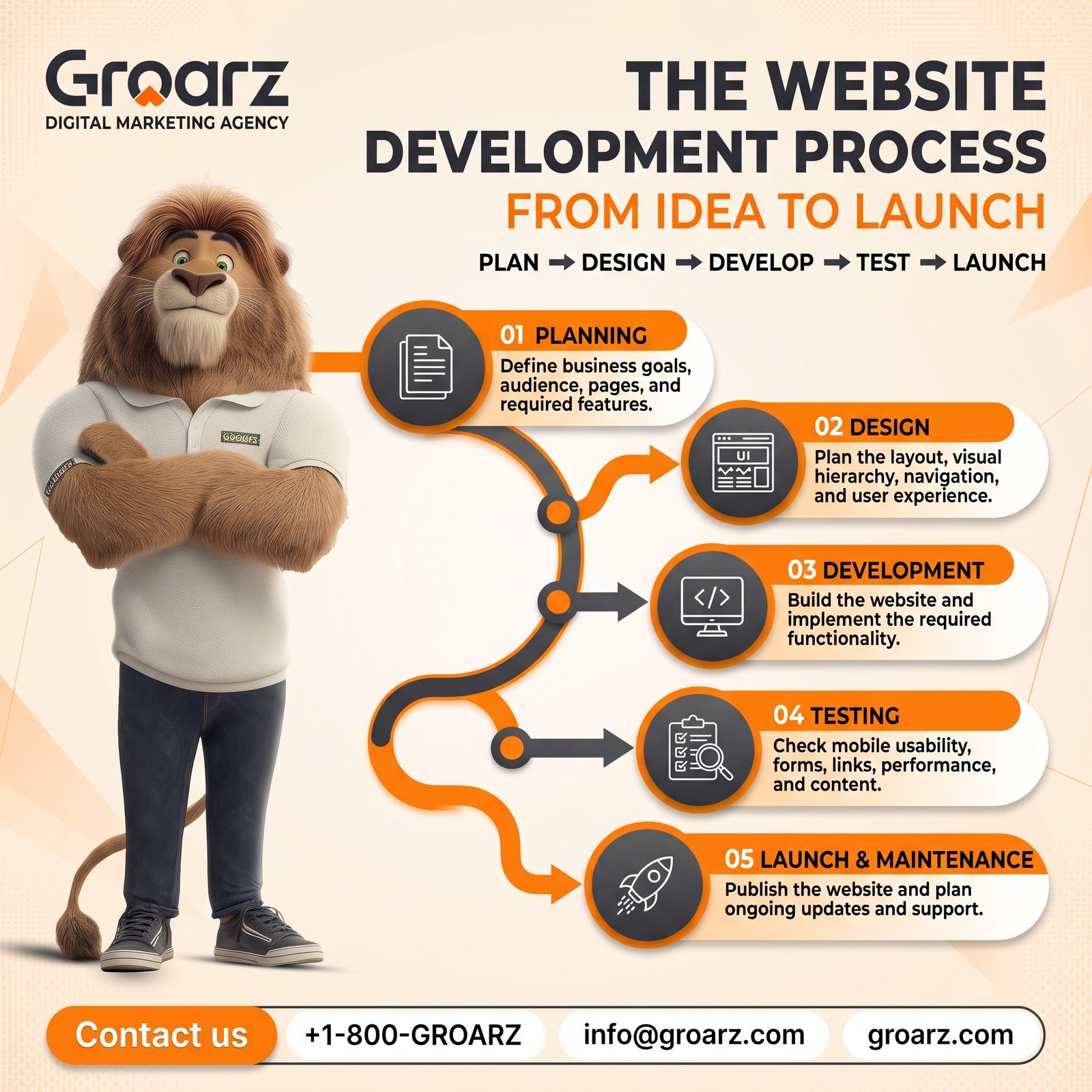
Website development involves planning, building, testing, and maintaining a website. The exact process depends on the project’s size, purpose, technology, and requirements.
Website planning and structure
The first step is to understand the business and its audience. This includes identifying the website’s main purpose, required pages, important user actions, and the information visitors need.
A typical small business website may include:
- Home
- About
- Services or products
- Portfolio or gallery, where relevant
- Blog or resources, if needed
- Contact
Not every website needs every page. The structure should match the business rather than follow a fixed template.
Website design and user experience
Website design determines how information is presented and how visitors move through the site. It includes layout, typography, spacing, colours, images, navigation, and visual hierarchy.
Good design helps visitors recognise important information and understand what to do next. It should also reflect the business’s identity without making the site difficult to use.
Website development and functionality
Development turns the planned design into a working website. Depending on the project, this may involve a content management system, custom functionality, forms, product catalogues, booking features, or third-party integrations.
The technology should be chosen according to the website’s requirements, available resources, maintenance needs, and future plans.
Content integration
Website content includes service descriptions, headings, images, contact information, calls to action, and other material that helps visitors understand the business.
Content should be accurate, easy to read, and organised around the questions customers are likely to ask. A visually attractive website still needs useful content to serve its purpose.
Testing and launch
Before launch, the website should be checked on common screen sizes and browsers. Important links, forms, navigation, images, redirects, and contact details should also be tested.
A launch checklist helps reduce avoidable problems and makes it easier to confirm that the main user journeys work as expected.
Types of Websites for Different Businesses
Different businesses need different website structures. The right approach depends on what visitors need to do.
Business websites
A business website introduces a company, explains its services, and provides contact information. It may be suitable for consultants, agencies, construction companies, clinics, and many local service providers.
E-commerce websites
An e-commerce website allows customers to explore products and, where configured, purchase them online. It may need product pages, category navigation, inventory management, checkout, payment integrations, and order notifications.
Portfolio websites
Portfolio websites highlight completed work, projects, designs, photography, or other examples of a business’s capabilities. They are particularly useful when visual examples help customers evaluate the service.
Booking and appointment websites
Businesses that manage appointments may benefit from booking functionality, availability information, confirmation messages, and links to relevant services.
Informational and educational websites
These websites organise information for visitors. They may include articles, guides, frequently asked questions, learning resources, or detailed service explanations.
Choosing the right website type at the planning stage helps avoid unnecessary features and supports a more focused development process.

Essential Features of a Business Website
A business website should prioritise usability, clarity, and reliability. Consider these important elements.
Clear navigation
Visitors should be able to find the main pages without searching through confusing menus. Use descriptive labels and keep the structure consistent across the website.
Responsive design
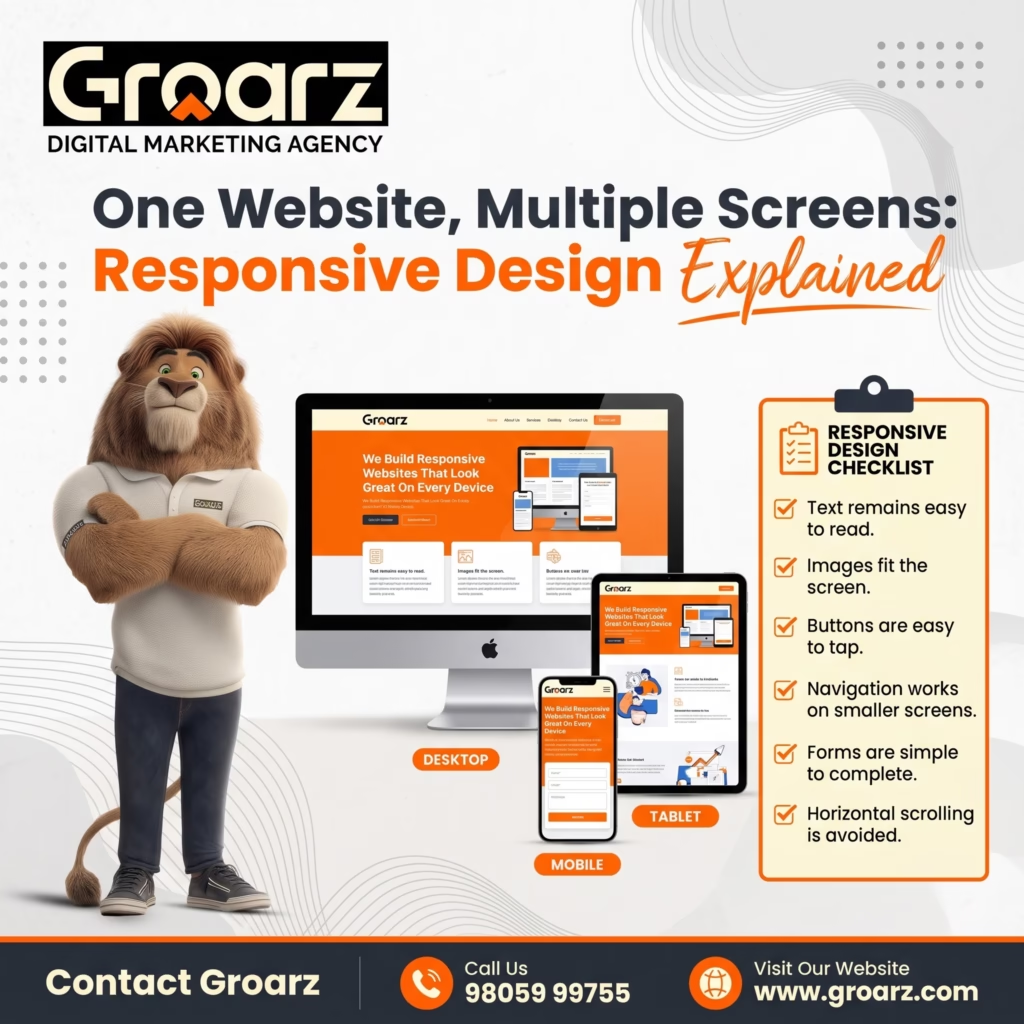
The layout should adapt to mobile phones, tablets, laptops, and larger screens. Text, buttons, forms, images, and navigation should remain usable on smaller devices.
Useful calls to action
A call to action tells visitors what they can do next. Examples include contacting the business, requesting information, booking an appointment, or exploring a service.
Choose actions that reflect the actual services and processes available.
Secure website connection
HTTPS helps protect data transmitted between a visitor’s browser and the website. Websites that collect personal information should also handle that information responsibly.
Fast and efficient pages
Large images, unnecessary scripts, and poorly configured resources can affect loading performance. Optimisation should focus on real issues rather than adding features that do not benefit visitors.
Accessible content
Use readable text, sufficient contrast, meaningful link labels, descriptive image alt text where appropriate, and forms that are understandable. Accessibility improvements can help more visitors use the website.
Easy content management
If the business needs to update services, images, articles, or other information regularly, consider how those updates will be managed. The website’s content management approach should fit the team’s skills and workflow.
Why Mobile-Friendly Website Design Matters
Many people browse websites on mobile devices. A website that is difficult to navigate on a phone can make it harder for visitors to understand services or contact the business.
A mobile-friendly website should consider:
- Text that is readable without unnecessary zooming.
- Buttons and links that are easy to tap.
- Navigation that works on smaller screens.
- Images that fit the screen without awkward cropping.
- Forms that are simple to complete.
- Contact options that are easy to find.
- Page layouts that do not require excessive horizontal scrolling.
Test the actual website on different screen sizes. A design that looks good in a desktop preview may still need adjustments on a phone.
Mobile usability is also part of delivering a good overall website experience. It should be considered during planning and development, not treated as a final decorative change.
How SEO and Website Development Work Together
Website development and search engine optimisation support each other, but they serve different purposes. Development creates the structure and functionality of the site, while SEO helps search engines understand relevant pages and helps users discover them through search.
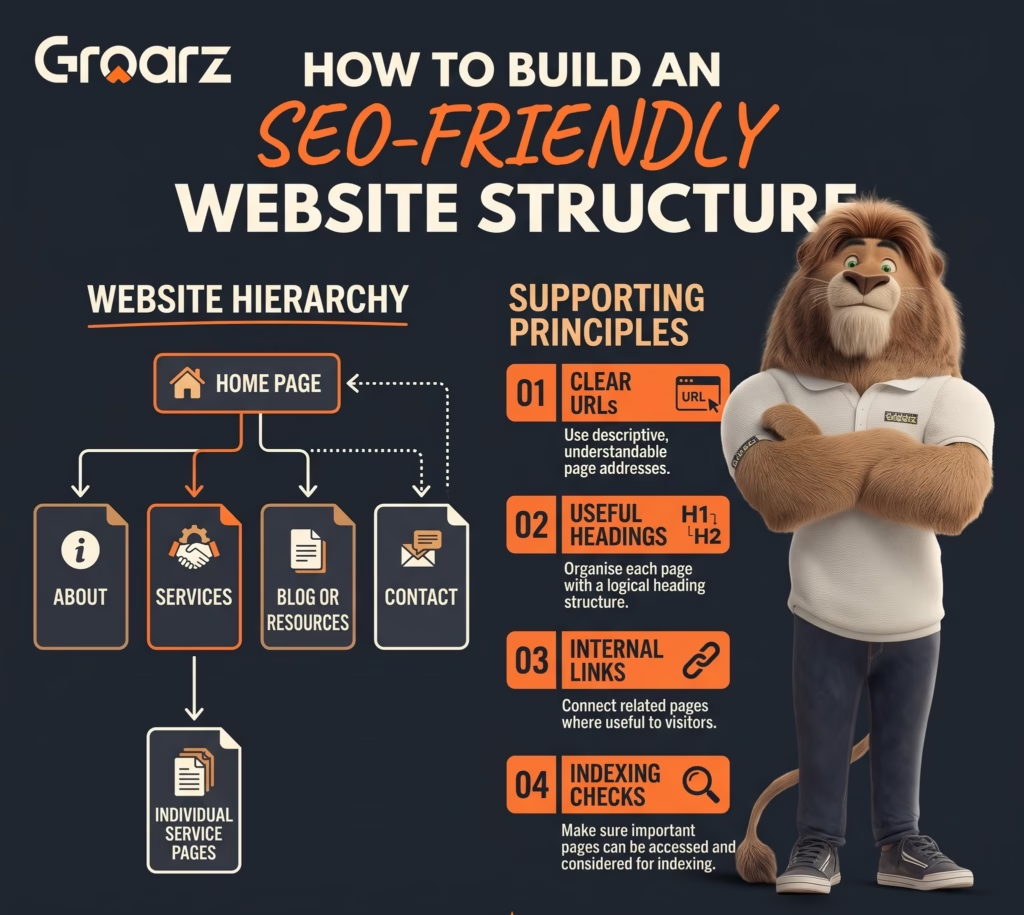
Build a logical page structure
Organise pages around clear topics and services. Use descriptive URLs, appropriate headings, and navigation that helps visitors understand the relationship between pages.
Make important content accessible
Search engines need to be able to access and process the content you want indexed. Avoid accidental indexing blocks and check important pages after launch.
Use descriptive page titles and headings
Each important page should communicate its topic clearly. Titles and headings should reflect the actual content rather than repeat keywords unnecessarily.
Optimise images and page performance
Use appropriately sized images, descriptive file names where useful, and relevant alt text. Efficient page resources can help deliver a better experience, although no single performance improvement guarantees a higher ranking.
Plan internal linking
Link related pages where the links help visitors explore a topic. For example, a service page may link to a useful guide that answers a common customer question.
Check the website after launch
Review indexing, redirects, broken links, page titles, mobile usability, and analytics setup. If an existing website is being redesigned, preserve useful URLs where possible and plan appropriate redirects when URLs must change.
For businesses seeking website development in Nagercoil, considering SEO during the planning stage can help avoid preventable structural and content problems later.
How to Choose a Website Development Company in Nagercoil
Choosing a development partner involves more than comparing visual designs. Look at how the provider understands your requirements and explains the work involved.
Review relevant work
Explore the provider’s portfolio, where available. Consider whether the examples show clear navigation, usable layouts, suitable mobile behaviour, and features relevant to your project.
Discuss your business requirements
Explain your audience, services, required pages, expected user actions, and any integrations you need. A suitable provider should ask questions before proposing a solution.
Understand the project scope
Clarify which pages, features, content, integrations, and revisions are included. Confirm what is outside the scope so that expectations are clear.
Ask about ownership and access
Discuss domain ownership, hosting access, website administration, backups, and who will control important accounts. Make sure the arrangement supports your ability to manage the website.
Discuss maintenance and updates
Websites may need software updates, backups, security checks, content changes, and troubleshooting. Ask who will handle these tasks after launch and what support is available.
Consider SEO readiness
Ask how the development process will handle page titles, URLs, mobile usability, redirects, indexing, and other relevant SEO requirements.
A good decision should be based on the fit between your needs, the proposed solution, communication, and long-term maintenance—not on unsupported promises.
Common Website Development Mistakes to Avoid
Designing without a clear goal
A website should have a purpose. Decide whether it is primarily intended to explain services, showcase work, collect enquiries, sell products, or support another business objective.
Overloading the homepage
Trying to include every detail on one page can make information difficult to scan. Use a clear hierarchy and provide dedicated pages for important services where appropriate.
Ignoring mobile users
Always test navigation, forms, text, and buttons on mobile screens. Do not assume that a desktop layout will automatically work well on smaller devices.
Using unclear calls to action
Visitors should understand how to enquire, book, or find additional information. Use specific labels that describe the action and ensure the destination works.
Forgetting SEO during a redesign
Changing URLs without a redirect plan or removing useful content can affect existing search visibility. Review important pages and current search performance before making major changes.
Neglecting maintenance
A website needs appropriate ongoing attention. Establish a plan for backups, updates, security, content accuracy, and technical checks.
Adding unnecessary features
Extra animations, plugins, integrations, and scripts can increase complexity. Choose features based on actual user needs and maintainability.
How to Prepare for a Website Development Project
Before starting a project, gather the information your developer will need.
- Define your goal: Decide what the website should help your business achieve.
- Identify your audience: Describe the people who will use the website and the information they need.
- List the required pages: Prepare a simple sitemap covering your main pages and services.
- Collect your content: Gather accurate business information, service descriptions, contact details, and suitable images.
- Prepare your brand assets: Organise your logo, colours, typography preferences, and any existing design guidelines.
- Identify required features: List forms, bookings, product catalogues, integrations, or other functionality that is genuinely needed.
- Plan website management: Decide who will update the content, manage access, and arrange maintenance.
- Agree on success measures: Depending on the website’s purpose, track enquiries, form submissions, appointments, sales, or another relevant action.
Good preparation makes it easier to communicate requirements and evaluate whether the finished website meets the original goals.
Conclusion
A well-planned website helps businesses present their services clearly, provide useful information, and make it easier for customers to take the next step. Effective website development combines design, functionality, content, mobile usability, technical quality, and ongoing maintenance.
For businesses in Nagercoil, the best starting point is to define what the website needs to achieve and choose a development approach that supports those goals.
If you are exploring website development in Nagercoil, visit Groarz to learn more about its digital services and discuss your website requirements.
Call Groarz at +91-7904759271 or request a free estimate online.
Frequently Asked Questions About Website Development in Nagercoil
1. What is website development in Nagercoil?
Website development in Nagercoil refers to planning and building websites for businesses and organisations serving the local area. Projects may include business websites, portfolio websites, e-commerce stores, and other websites tailored to specific needs.
2. Why does a small business need a website?
A website gives a small business a dedicated place to explain its services, share useful information, display its work, and provide contact options. It can also support SEO and other digital marketing activities.
3. What should a professional business website include?
A business website commonly needs clear navigation, useful content, accurate contact details, responsive design, suitable calls to action, HTTPS, and an easy way to manage relevant information. Additional features depend on the business.
4. Is mobile-friendly website design important?
Yes. Mobile-friendly design helps visitors read content, navigate pages, and use forms on smaller screens. Test the actual website on different devices to identify usability problems.
5. Can website development help with SEO?
Yes. A well-built website can support SEO through logical structure, accessible content, descriptive page titles, appropriate URLs, internal links, and performance improvements. Rankings still depend on many other factors.
6. What is the difference between website design and website development?
Website design focuses on how a website looks and how people interact with it. Website development builds the functional website and implements its structure, features, and integrations. Many projects involve both.
7. Should I use WordPress for my business website?
WordPress may be suitable when you need a content management system for pages, blog articles, and regular updates. The best platform depends on your required features, technical needs, maintenance plan, and budget.
8. What should I ask a website development company before starting?
Ask about the project scope, relevant experience, timeline, revision process, platform, ownership, hosting, maintenance, mobile testing, and SEO requirements. Request clear documentation of what is included.
9. Will my website need maintenance after launch?
Most websites need some level of ongoing maintenance, such as backups, software updates, security checks, and content reviews. The appropriate plan depends on the platform and functionality.
10. How can Groarz help with website development?
You can contact Groarz to discuss your website goals, required pages, functionality, and digital marketing needs. Ask for a project scope that explains the proposed work, responsibilities, and ongoing maintenance arrangements.